How can we help you?
Online services
I already have access to My Account online - how do I add other existing accounts to my email?
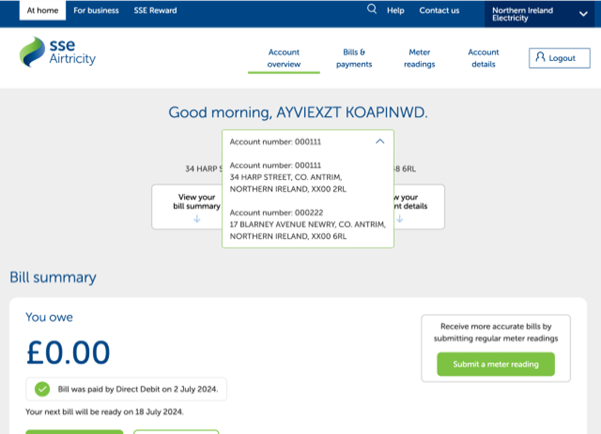
We've updated our online services so you can access all your existing accounts with one email and password instead of separate usernames and passwords. This means you'll only have to register for My Account once. Your dashboard will include a dropdown menu to swap between your accounts.
Please note: This feature is currently unavailable for new registrations.
If you need to register a new SSE Airtricity online account but your email is already taken, please use a different email or contact Customer Service for support.
If you see the page below it means you've already updated at least one of your accounts usernames to your email and need to enter the password for this updated account.
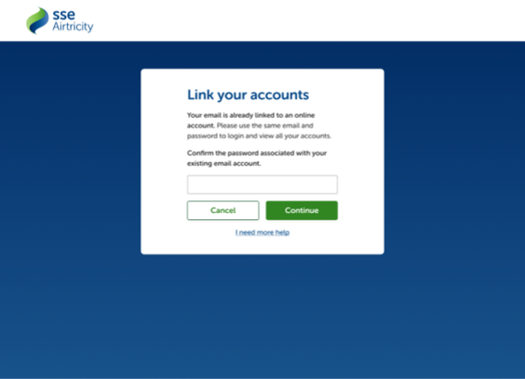
If you're updating to access all of your accounts with your email and you keep seeing an incorrect password message, you need to make sure you can access the account already associated with your email and enter the same password on this page.
Follow these steps below to link your accounts successfully:
- Step one: log in to your online account with your email and password. Remember this password, and log out.
- Step two: Access each of your accounts with their individual usernames and passwords. You’ll be prompted to update to your email and verify your inbox with a 6-digit code.
- Step three: Once this step is completed, confirm your identity with the password linked to your email account (same password used in step 1).
Why can’t I type a different password here?
You need to link all accounts under the same existing password in order to use a single email for multiple account numbers/addresses.
To change your password, log in with your email and current password and update it in the 'Account details' section. You can also reset your password via the 'Forgot password' option on the login page using your account number and email.
How do I swap between my energy accounts after I log in?
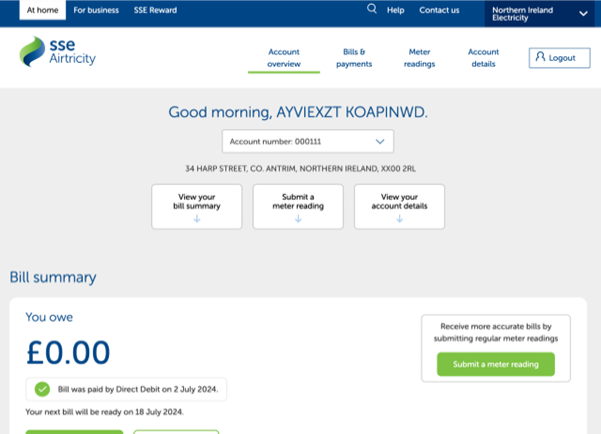
Once you log in and your accounts are linked successfully, a dropdown option will appear in the 'Account overview' section. This lists all of your active and inactive SSE Airtricity accounts and addresses.
I want to use a different email for my other accounts, how do I do this?
For security reasons, you cannot use different emails for different accounts, unless we have multiple emails on record.
If you don't have multiple emails on file, contact Customer Service.
What if I don’t want to link my accounts?
If multiple emails are on record, you can use any of them for different account numbers/addresses. Adding emails not already in the system is not allowed.
If you don't have multiple emails on file, contact Customer Service.
Monday to Friday
8am - 6pm