How can we help you?
Meters
Meter reading guide
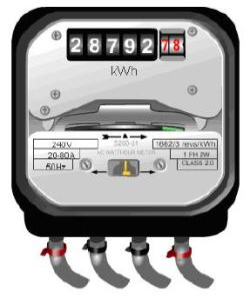
1. Popular single rate meter (model number T031): Records your energy usage at the same rate 24 hours every day. This type of meter is also billed for its standing charge and Climate Change Levy (CCL).
Standard meters are the most common and have one single row of numbers.
To read your meter:
1. Read the numbers from left to right, including any zeros
2. Ignore any numbers after the decimal point, or numbers in red.
The reading for this meter is 28792
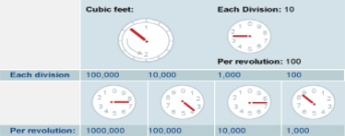
Dial (Clock) Meters
If you have a dial/clock meter it will have six dials. To take your meter reading, you'll need to read the five dials on the top row.
Record the number on the display from left to right, ignoring any figures in red or surrounded by a red box.
2. Day / Night meter (model number T032/34): Records your energy on different rates for your day and night usage.
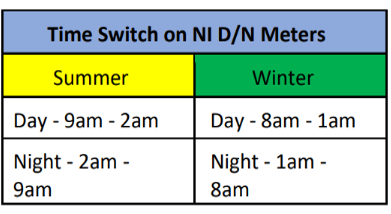
- Day time usage covers 9am to 2am in the summer, and 8am to 1am in the winter
- Night time usage covers 2am to 9am in the summer, and 1am to 8am in the winter
This type of meter is also billed for its standing charge and CCL.
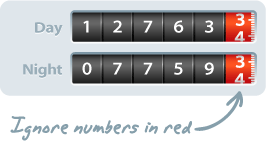
To read your meter:
• Scroll or wait until you see the 'R1' and 'R2' screens. R1 is your Day reading, and R2 is your Night reading.
• Write down the numbers on the screen from right to left, including any zeros. Ignore any numbers after the decimal point.
Please note: some Day/Night meters may also have an 'R3' reading, if you have a storage heater metered separately. Please record your R3 reading along with your R1 and R2 readings.
3. Weekender meter (meter model T033): Records your energy usage at different rates for your evening usage, weekend usage and day time usage.
Weekender meters read differently during the evening and weekend than during the day. Same times as a Day/Night meter above but night rate applies to the weekend.
To read your meter:
• Scroll or wait until you see the 'R1', 'R2'and 'R3' screens. R1 is your Day reading, and R2 is your Night reading and R3 is your Weekend reading
• Write down the numbers on the screen from right to left, including any zeros. Ignore any numbers after the decimal point
Please note: some Nightsaver customers may also have a 'R3' reading, if you have a separately metered storage heater.
4. Off Peak Meter (T041 T042 and T043): Like a popular meter but gets a different rate on various peak hours
To read your meter:
1. Read the numbers from left to right, including any zeros
2. Ignore any numbers after the decimal point, or numbers in red.
The reading for this meter is 28792
Dial (Clock) Meters
If you have a dial/clock meter it will have six dials. To take your meter reading, you'll need to read the five dials on the top row.
5. Low Voltage Max Demand (LVMD - T101/T035): These meters have many charges such as Capacity Charge, Day,
Night, Summer, Winter, Winter Off Peak, Excess Capacity Charge, Standing Charge and PSO
Levy. Cannot change billing cycle on these meters and usually have a high MIC. The meter will read itself every 30 minutes or a technician from NIE Networks will read the meter, you are not required to submit a meter read for these.
Have a question?
Monday to Friday
9am - 5.30pm
Our Customer Service Team is here to help.